Commit3x User Guide
Commit3x Intro

Who is the most popular? Who has the ‘most friends’ or the
‘best social proof’? Who is good friends with you? Commit3x is an online game
that tries to answer real world questions: who would Vote for you? Commit3x is
where everyone gets 3 Votes to place for their favorite people. The Web Site
is: https://www.Commit3x.com/
Commit3x is an entertainment Web Site where Real People place
Votes for other Real People they like. It’s an emotional and silly drama about
who is the ‘most popular’. The key is Real People. Members contractually agree
to use their real names and agree to the legally binding Commit3x Web Site Terms
of Use. They agree to not cheat nor open accounts using a different name. Purchasing
a Commit3x PIN (Personal Identity Number) lets you place your Votes, and anyone
can win Votes placed by Commit3x Members.
Commit3x Web Site Terms of Use
Commit3x’s purchased products (PIN and Token) are delivered
online immediately and stored in the Commit3x Web Site Database. They solely
enhance enjoyment of the Web Site. Commit3x is only usable by USA residents,
and minors should ask their guardians before making purchases online. To make a
purchase at Commit3x you agree to the Web Site Terms of Use, which you verify
using a checkbox. The full Terms of Use are available at https://www.commit3x.com/Stuff.html#Legal. You
should review them if you use Commit3x.
Navigation
The Commit3x Web Site has four Tabs:
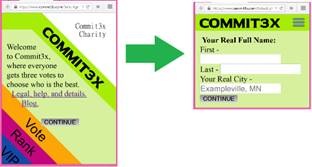
- Commit3x Intro and About. Member Accounts
-
Vote Vote
for your Favorite People
- Rank Public Access: See Vote Totals
- VIP Extras obtained using Commit3x Tokens
Switch tabs by clicking the diagonal text. Large screens fit
the full content between the diagonals. On smaller screens the tabs start as
short intros, click again to use the tab (then use the navigation icon  to switch tabs).
Join to Vote
At Commit3x, the Rankings tab is free for anyone to use so
you can look for your name or people you know. To place Votes you will need to
buy a Commit3x PIN and agree to the Terms of Use. The next section explains how
to purchase a PIN.
How to Join Commit3x and Log In: Your PIN
To place
Votes you purchase a PIN (one-time cost: $5.00, subject to change). This
establishes your Member Account, and gives you access to your 3 Votes.
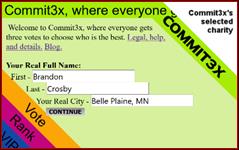
Start at www.Commit3x.com
on the Commit Tab.
Enter your real name and city as shown and press ‘CONTINUE’.
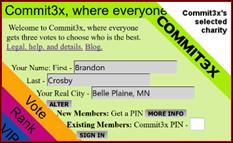
Verify your name and city is right (click ‘ALTER’ to change).
Then press ‘MORE INFO’ to the right of ‘New Members’.
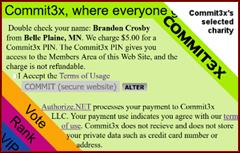
Read and accept the Term of Use (click the link to view).
Check the checkbox agreeing to them. If you don’t agree to the terms, do not
continue.
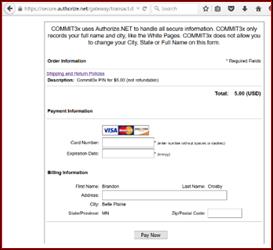
Press ‘COMMIT (secure website)’ to pay for the PIN. Authorize.NET
handles your payment information and Commit3x does not see these details. Your Web
Browser’s security features, such as icons like
 ,
verify your payment details are safe. To continue press ‘Pay Now’.
,
verify your payment details are safe. To continue press ‘Pay Now’.
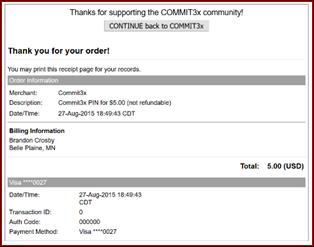
After
paying, you receive an online receipt that you should print or save for your
records.
Press ‘CONTINUE back to Commit3x’ to receive your PIN by
immediate online delivery. You must do this to receive your PIN.
There is no email receipt because Commit3x does not have user email addresses.
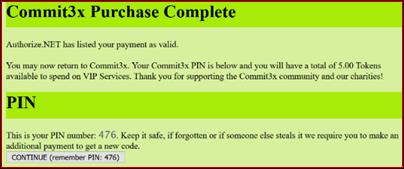
Memorize your Commit3x PIN. In the example the PIN is
476. To log in you enter the PIN in the ‘Existing Members’. If you lose your
PIN Commit3x requires you to purchase another.
Rank Tab: Vote Totals
Anyone, even without a Commit3x PIN, can use the Rank Tab to
see Vote Totals and find specific people. Anyone, even without a Commit3x PIN,
may have already won Votes placed by Commit3x Members.
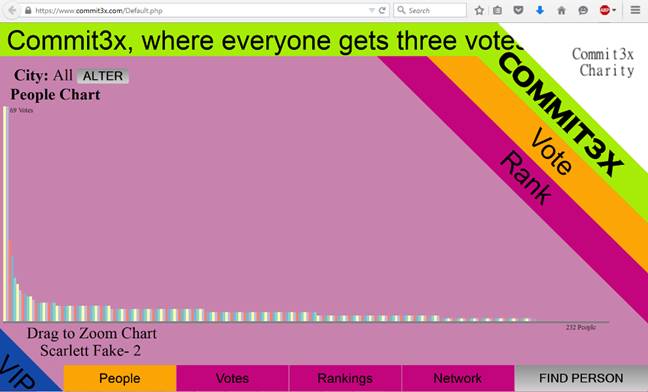
Rankings are shown for all cities (All), or a
specific city. Press ‘ALTER’ to pick a different city. After entering the city
and state abbreviation press ‘VERIFY’.
Press ‘FIND PERSON’ (bottom right area on the screen) to
search for a person you know. Enter their name and press ‘SEARCH’. If the
person has votes, they will be marked in red on the chart and their details
will appear under the chart. The different charts show different details about
the person you have found. You can click on the charts to highlight a person. The
red X clears this highlight.

Hovering over the chart you will see details of each person.
In the People chart, you can drag in the chart to zoom in (drag from left to
right in the bars of the chart). After zooming in a new ‘SHOW ALL’ button
appears that restores the original view.
The four charts Commit3x offers to the public are:
- People, a vertical bar chart with one bar per person showing their Won Votes
- Votes, a horizontal bar chart showing all Votes won by person
-
Rankings, a breakdown of who is in what Rank Level
- Network, a visual display of who voted for whom, with no visible names
Vote Tab: Picking People
Commit3x Members use their PIN to log in and Vote in Vote
tab. Normally you Vote for Real People you know. But, you can vote for yourself
or for any random words. Votes can be placed for anyone. If later they join
Commit3x, they will have Votes immediately.
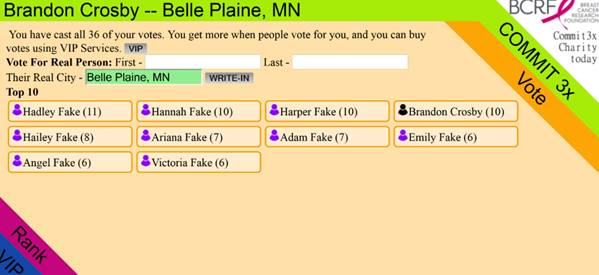
Writing-Ins
 To vote
for other people, enter their name in the First and Last fields. Then, enter
their City into the City field. If you change the city press ‘VERIFY’ to
confirm.
To vote
for other people, enter their name in the First and Last fields. Then, enter
their City into the City field. If you change the city press ‘VERIFY’ to
confirm.
Press ‘WRITE-IN’ to continue. Finalize the vote by pressing
‘COMMIT VOTE’.
Top 10 Ballot
The Top 10 Ballot shows the 10 people with the most votes in
the City. Click on any of these people to vote for them.
Altering Votes
You can always pick to Vote for different people if your
Votes are all used. Select the existing Vote you want to change.

More Votes
All Members get 3 Votes to start (it is Commit3x, where
everyone gets three Votes).
When a Member wins 4 Votes, they receive 1 extra Vote. So, a
person who Won 10 Votes would have 5 available to place.
In the VIP Services section Tokens can be used to obtain
additional Votes. This is explained in the next section.
VIP Tab: Services
The VIP Tab offers extra VIP Services on the Web Site. You
can buy Commit3x Tokens and use them for VIP Services (new Members receive 5
Tokens).
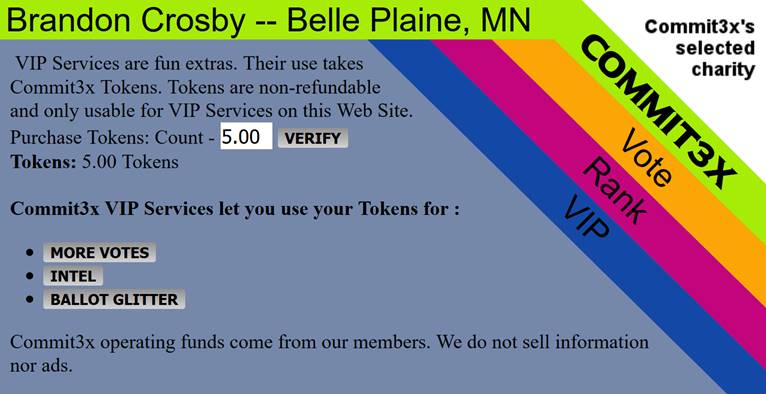
A Token typically costs $1.00 (subject to change). To purchase
Tokens, enter how many to buy and press ‘VERIFY’. This shows the cost. Accept
the Web Site Terms of Use, and click ‘BUY TOKEN(S)’ to continue. Like buying
the PIN, Authorize.NET guides you through the payment process. Tokens are
stored in the Commit3x Web Site Database immediately. Contact Technical Support
immediately if you believe the Tokens were not delivered after you made a
payment.
 Your
Tokens Available appears on the VIP Tab. We allow up to 100 Tokens per Account
at a time, and Tokens must be bought in quantities of 5-50. See the Web Site
Terms of Use for more details.
Your
Tokens Available appears on the VIP Tab. We allow up to 100 Tokens per Account
at a time, and Tokens must be bought in quantities of 5-50. See the Web Site
Terms of Use for more details.
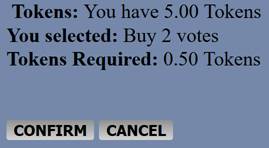
To use Tokens, first pick what you want. Then you will be
shown what you are about to use your Tokens for. Press ‘CONFIRM’ to use the
Tokens or ‘CANCEL’ to quit. Commit3x does not cancel VIP Services you have
selected, and does not put Tokens back into your Member Account.
VIP Service Details
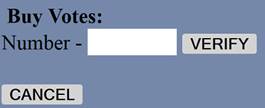
More Votes: Use Tokens for Votes.
Enter a number of votes and press ‘VERIFY’ to review.
Intel on Real People:
Intelligence Reports (Intel) shows who Voted for who. Press
‘INTEL’ and enter the person’s details. Press ‘SEARCH’ to see how many Votes
involve the person.
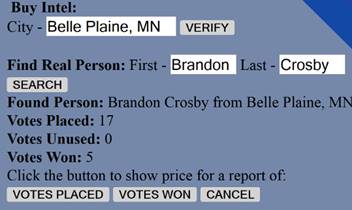
To see who they Voted for press
‘VOTED PLACED’. To see who Voted for them press ‘VOTES WON’. Then review the
Tokens required and press ‘CONFIRM’ to get the report.
Member Accounts with purchased Intel
Reports have a ‘SHOW’ button to the right of the ‘BUY INTEL’ button. Press
‘SHOW’ to pick from the available Intel. Click the specific report to view it.

The Intel Report includes Votes,
who voted and who won the vote.

Ballot Glitter: Ballot
Glitter helps you get Votes by changing your appearance at Commit3x.com.
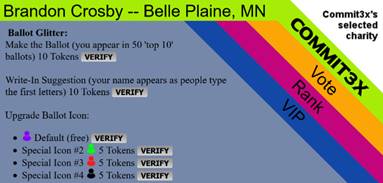
-
Make the Ballot puts you on 50 random Top 10 Ballots regardless
of your Total Won Votes
-
Write-In Suggestion lists your name if someone types the first few
letters (limit: 10 names)
-
Upgrade Ballot Icon gives you stylish Ballot Icons instead of the
normal default icon
Commit3x Tab for Members
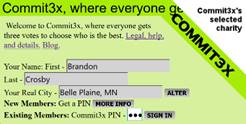
To log in
to your account, you use your PIN and full name. Press ‘SIGN IN’ to continue.
If you lose your PIN, you must buy a new one like a New Member
since
Commit3x does not have an email addresses and Technical Support may be unable
to give you a specific Person’s PIN.
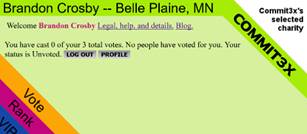
Once signed in, your name and city appear at the top of the
screen. You can details about your Votes (won, placed, available) and a Ranking
class based on how many Votes you won.
Press ‘LOG OUT’ to sign out securely.
Press ‘PROFILE’ to manage your Commit3x account. The Profile
commands are shown below.
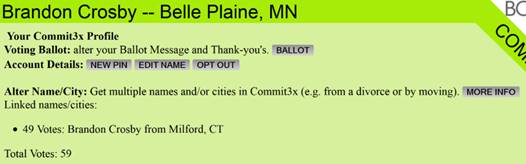
Profile: Ballot
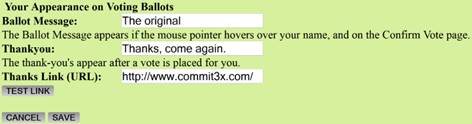
Press ‘BALLOT’ to change free details effecting the way you
appear to people who might Vote for you:
- The Ballot Message appears when confirming a Vote for you
-
The Thank-you Message and optional Thank-you URL are shown after casting
a vote for you
Press ‘SAVE’ to confirm changes. The URL is optional and can
be blank. Press ‘TEST LINK’ to try the URL.
Profile: New Pin
Press ‘NEW PIN’ to obtain a new random PIN (you must know
the original PIN and log in to do this). Be sure to remember the new PIN
because it will become your permanent new PIN and the one you originally
purchased will no longer function.

Profile: Edit Name
Press ’EDIT NAME’ to adjust your name slightly without
actually changing the name. You can change the capitalization and make minor
changes. Press ‘SAVE’ to confirm or ‘CANCEL’ to quit.
Profile: Opt Out
Press ‘OPT OUT’ and then confirm to take your name off of
the web site, hiding your Vote totals. Opted Out accounts cannot use the
Members area and lose the normal Member privileges. Non-members may Opt Out by
(1) joining and then opting out, or (2) sending a technical support request
email with your full name, city and proof you are who you say such as a driver’s
license or a utility bill. To get back to normal Commit3x.com Member status you
have to buy a new PIN.
Profile: Alter Name/City
Commit3x enforces one account per real person, but if your
name or city legitimately changes, we encourage you to keep your existing
Commit3x account with its votes, VIP Services and other Commit3x data with you,
and purchase another PIN using your new name/city. Then more people may Vote
for you using your new name or city. It also combines your total votes in
Rankings for each account.
First by a PIN with your new information, like when you
bought your first PIN.
Then combine the accounts. Log in to either account. Press
‘MORE INFO’ to the right of Alter Name/City. This shows the message below,
press ‘CONTINUE’ since you have your new account’s information.

Enter the other account’s information. Press ‘MERGE’ to
combine the accounts.

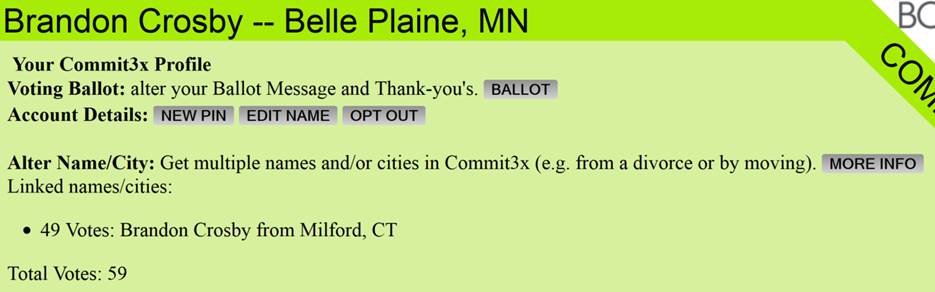
Once your accounts are combined, you will see the individual
accounts’ Vote totals in your Commit3x tab. In the image, the Milford account
is contributing 49 votes towards the total which is displayed for the Belle
Plaine and the Milford account in the Rankings tab.
Web Site Technical Support
Commmit3x technical support is provided by email at the
email address webmaster@commit3x.com.
Payment Issues
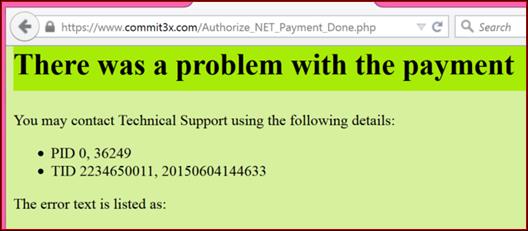
If various technical errors happen, you may receive error
message(s). Contact Commit3x Technical Support with this information for help. Remember,
you can only use your real name and city to make Commit3x purchases. If your
computer or internet connection quits at the moment of payment, Commit3x
Technical Support may be able to help.